

Companies are still buying ERP systems the old way: pick the modules, configure the workflows, bolt on AI later if there's budget left. That order is backward now. Retrofitting AI and automation into a live ERP costs more, takes longer, and breaks more than embedding it from day one. This guide walks through what a future-ready 2026 implementation actually requires, and where most projects quietly set themselves up to fail.
Overview:
AI-ready architecture and data foundations support automation and intelligent workloads.
A clear implementation roadmap with process mapping, measurable objectives, cross-functional ownership, and phased milestones.
Copilot and automation capabilities can extend ERP functionality and reduce manual work.
Changing management and rolling out strategy supports adoption and reduces implementation risk.
Governance and performance metrics maintain control and measure the impact of the ERP after it goes live.
Why an ERP Without AI Built In Is Already Obsolete
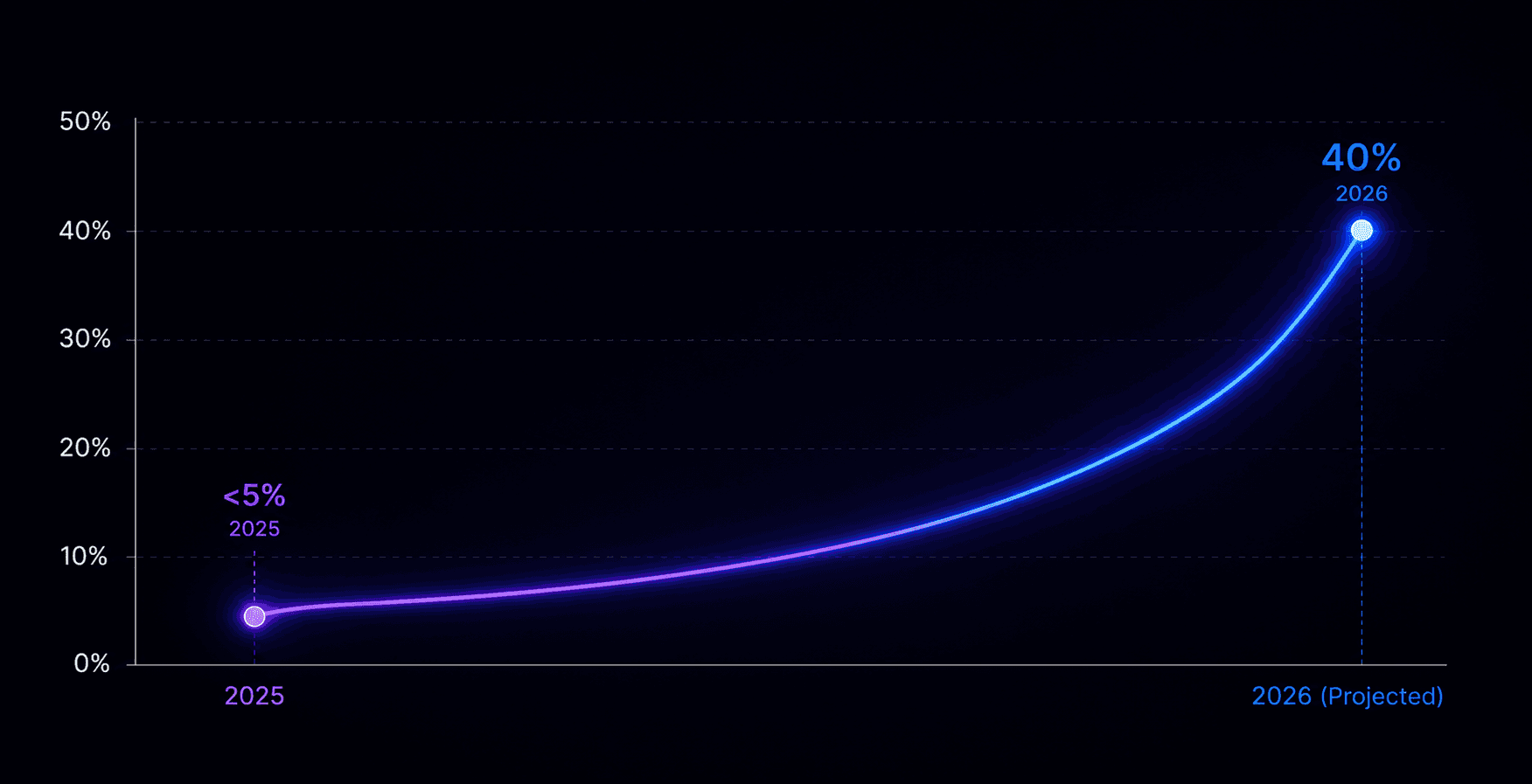
Gartner's research on enterprise AI agent adoption found that fewer than 5% of enterprise applications carried true task-specific AI agents in 2025, a figure projected to reach 40% by the end of 2026. An ERP designed without that shift in mind isn't future-ready, it's already behind. Every module you configure without AI in the plan becomes a retrofit project later.
Skip This Roadmap and Your ERP Project Is Already in Trouble
A roadmap missing any of these steps is a roadmap heading toward scope creep and a blown budget. Before a single module gets configured, your project needs:
A cross-functional team spanning IT, finance, operations, and the people who'll actually use the system
Documented current-state process mapping, so you know what you're replacing, not just what you're buying
Measurable objectives tied to efficiency, scalability, and where AI fits, not vague statements about modernization
Phased milestones with real resource allocations, not a single go-live date and hope
Why an ERP Without AI Built In Is Already Obsolete
Gartner's research on enterprise AI agent adoption found that fewer than 5% of enterprise applications carried true task-specific AI agents in 2025, a figure projected to reach 40% by the end of 2026. An ERP designed without that shift in mind isn't future-ready; it's already behind. Every module you configure without AI in the plan becomes a retrofit project later.
Skip This Roadmap and Your ERP Project Is Already in Trouble
A roadmap missing any of these steps is a roadmap heading toward scope creep and a blown budget. Before a single module gets configured, your project needs:
A cross-functional team spanning IT, finance, operations, and the people who'll actually use the system
Documented current-state process mapping, so you know what you're replacing, not just what you're buying
Measurable objectives tied to efficiency, scalability, and where AI fits, not vague statements about modernization
Phased milestones with real resource allocations, not a single go-live date and hope
An ERP Architecture That Can't Support AI Will Cost You Later
Bolting AI onto a rigid, siloed data structure after go-live is one of the most expensive mistakes an ERP project can make. An AI-ready architecture needs flexible data ingestion, a unified storage layer that supports real-time analytics, and modular services that let AI workloads scale independently instead of dragging down the whole system. Data governance has to enforce quality and lineage from the start, because AI trained on bad data just automates bad decisions faster.
Fall Behind on Copilot and Automation, and Your Competitors Won't Wait
Microsoft's own Business Central Copilot documentation covers how to configure and extend these capabilities, and teams that skip this step are leaving productivity gains on the table that competitors are already capturing. Our breakdown of manufacturing automation on Dynamics 365 covers what this looks like in practice, from natural-language assistance in core modules to RPA-driven workflows that cut manual handoffs. Getting Dynamics 365 Copilot automation right takes planning, not just flipping a switch on go-live day.
Why Most ERP Rollouts Collapse Before They Even Launch
Change management isn't a soft add-on, it's the difference between a project that works and one that gets quietly abandoned by the people who were supposed to use it. Prosci's research found that projects with excellent change management are roughly seven times more likely to meet their objectives than projects with poor change management, and nearly five times more likely to stay on schedule. Skip stakeholder impact assessments and phased pilots, and you're building toward exactly that failure.
Pick the Wrong Rollout Strategy and Pay for It for Years
Method | Benefit | The Risk You're Accepting |
Big Bang | Fast, unified cutover | High risk, demands extensive pre-go-live testing |
Phased | Easier issue isolation | Longer overall timeline |
Hybrid | Pilot waves before full launch | Complex coordination across waves |
Panorama Consulting's research on rushed ERP implementations points to incomplete requirements gathering, poor data migration, and insufficient training as the recurring costs of accelerated timelines. A rollout strategy chosen for speed alone usually pays for that speed later, in rework.
No Governance Means Your ERP Is One Incident From Disaster
Without a steering committee, clear escalation paths, and scheduled audits, ERP governance defaults to whoever shouts loudest in a meeting. That's not a system, it's a liability waiting for the wrong moment. Build governance around IT, operations, finance, and security representation, and tie review cycles to your actual sprint cadence, not an annual checkbox exercise nobody remembers by March.
If You're Not Tracking These Metrics, You Won't See the Failure Coming
Uptime, transaction processing time, user adoption rate, support ticket volume, data accuracy, and AI model performance all need a baseline before it goes live, not a retrofit after leadership asks for numbers. Our guide on how agentic AI in Business Central cuts stockouts and overstocks is one concrete example of what these metrics look like in practice once AI is actually embedded rather than bolted on. Generative AI for planning, real-time anomaly detection, and AI-driven process mining are the next layer once the fundamentals hold.
Talk to NSquare Before You Build the Wrong Roadmap
Embedding AI and automation from day one is significantly cheaper than retrofitting it after go-live. Talk to NSquare about mapping your ERP roadmap so AI readiness is built into the architecture from the start, not added as an expensive afterthought.
FAQs
What are the key steps in ERP implementation?
Planning and stakeholder alignment, process mapping, system design, data migration, user acceptance testing, and a final cutover with post-go-live support, each with clear milestones and governance to keep the project on track.
How long does an ERP implementation take?
Most implementations run six to eighteen months depending on scope, complexity, and how ready the organization actually is. Phased rollouts extend the timeline but reduce risk, and skimping on planning almost always makes the timeline worse, not better.
What is the difference between big bang and phased ERP implementation?
Big bang deploys everything at once, offering a fast cutover but higher risk. Phased implementation spreads deployment across modules or business units, easing training and issue isolation at the cost of a longer overall project.
How do you maintain business continuity during ERP implementation?
Run legacy operations in parallel while piloting new modules in controlled environments, validate with data staging and simulation before going live, and build fallback plans for critical functions so a bad week doesn't become a bad quarter.
What resources are needed for an ERP project?
A dedicated project manager, technical leads, business analysts, data migration specialists, and training coordinators, backed by executive sponsorship and a cross-functional steering committee. Niche AI integration and change management work often needs outside expertise.


