Transform Customer Experience with AI-Powered Customer Sentiment & Agent Quality Analysis
The Customer Sentiment & Agent Quality Analysis Solution for Dynamics 365 empowers organizations to gain deeper insights into customer interactions, measure service quality, and proactively address customer experience risks. By leveraging AI-driven ana
lysis of email communications, the solution evaluates customer sentiment, agent performance, and case risk levels while providing actionable recommendations and automated escalation capabilities.
Designed to help service teams improve customer satisfaction and operational efficiency, this solution delivers a comprehensive view of customer experience through intelligent analytics, configurable sentiment models, and interactive dashboards.
Key Features:
AI-Powered Customer Sentiment Analysis
Analyze customer email interactions to determine sentiment, identify satisfaction levels, monitor sentiment trends, and detect potential customer risks before they escalate.
Agent Interaction Quality Assessment
Evaluate agent communications against key service quality indicators such as empathy, clarity, professionalism, and response effectiveness while generating AI-powered interaction summaries for deeper service quality insights.
Automated Escalation Framework
Proactively identify high-risk customer cases and automatically notify assigned agents and managers through email and in-app notifications, including case details, customer information, and direct links for immediate action.
Configurable Sentiment Recalculation
Enable administrators to configure sentiment analysis parameters and analysis windows dynamically. Recalculate sentiment scores, trends, and risk metrics on demand without modifying original stored values, supporting scenario-based analysis and decision-making.
Administrator Configuration Portal
Leverage a dedicated Canvas App-based administration experience to manage sentiment settings, analysis periods, thresholds, and calculation parameters across Cases, Contacts, and Accounts.
Interactive Dashboards & Visualizations
Access intuitive dashboards featuring sentiment summaries, trend analysis, risk indicators, performance metrics, and detailed investigation capabilities to support data-driven decision making.
AI-Driven Customer Experience Intelligence
Monitor customer satisfaction, evaluate agent performance, identify at-risk customers, and uncover service improvement opportunities through advanced analytics and intelligent insights.
Improve Service Quality and Customer Satisfaction
Empower customer service teams with actionable intelligence that helps them understand customer sentiment, optimize agent interactions, and proactively resolve issues before they impact customer relationships. By combining AI-powered analytics with automated workflows and configurable business controls, organizations can deliver exceptional customer experiences while improving operational efficiency.
Why Choose Customer Sentiment & Agent Quality Analysis?
Enhance Customer Satisfaction: Gain real-time visibility into customer sentiment and experience trends.
Improve Agent Performance: Measure communication quality and identify coaching opportunities.
Proactive Risk Management: Detect negative sentiment and high-risk cases before escalation.
Automated Escalations: Ensure critical customer issues receive timely attention from the right stakeholders.
Flexible Configuration: Adjust sentiment analysis models and business parameters to meet organizational needs.
Data-Driven Decision Making: Utilize comprehensive dashboards and AI insights to improve service strategies.
Seamless Dynamics 365 Integration: Work directly within existing Dynamics 365 Customer Service processes and workflows.
Experience the future of customer service intelligence with the Customer Sentiment & Agent Quality Analysis Solution—a powerful platform for understanding customer emotions, improving service quality, and driving customer success through AI-powered insights.
UI Snapshots :
Case
1. On the Case Summary Tab.
2. Added new Tab on Case
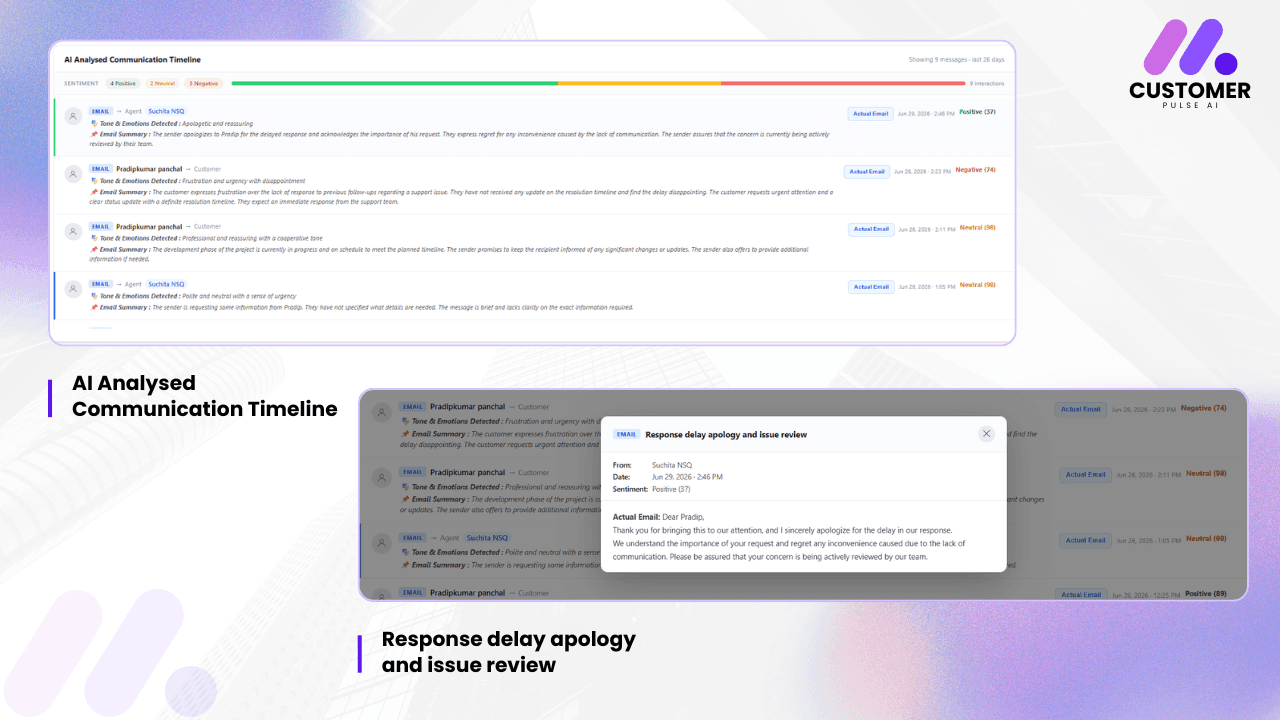
3. Content Sentiment Analysis Tab

On the click of Actual Email Button

Contact:
Added new Section
Account:
Added new Section

